
Free guide
How to find a GPS tracker on your car
Updated September 2026
Someone always seems to know where you’ve been. Your phone warned you about an AirTag. Or you bought a used car and want to know what’s still reporting. Here’s exactly where to look, how to scan for trackers with your phone, and what to do if you find one.
If you think someone is stalking you
Removing a tracker can alert the person watching it. If you’re worried about your safety, photograph the device where you found it and contact local police first. The National Domestic Violence Hotline is free and confidential, 24/7: call 1-800-799-7233, text START to 88788, or visit thehotline.org.
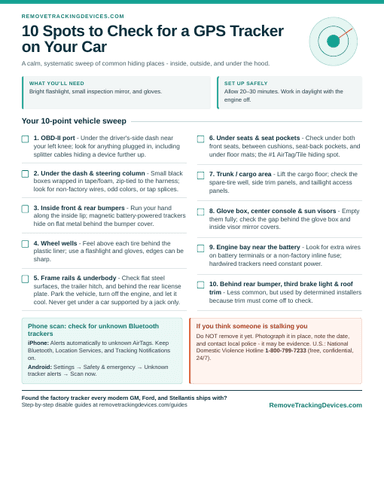
Free printable checklist
10 spots to check for a GPS tracker on your car
The same sweep a pro would do: inside, outside, and under the hood, plus how to scan for AirTags with your phone. One page, emailed to you as a PDF.
Signs your car may be tracked
- Someone knows where you’ve driven without you telling them
- Your iPhone shows “AirTag Found Moving With You,” or Android warns about an unknown tracker
- A small box, loose wires, or tape under the dash that wasn’t there before
- Something plugged into the OBD-II port that you didn’t install
- Unexplained battery drain on a car that sits for a few days
- The vehicle came from a rental fleet, company fleet, or buy-here-pay-here lot
The five kinds of car trackers
- Plug-in OBD-II trackers. They plug into the diagnostic port under the dash. Easy to install, easy to find.
- Battery-powered magnetic GPS trackers. They use a cellular connection and stick to metal underneath or inside bumpers. They need recharging every few weeks, so someone has to come back to them.
- Bluetooth item trackers. AirTag, Tile, and Samsung SmartTag have no GPS of their own. They report location through nearby phones, and they’re small enough to hide anywhere in the cabin.
- Hardwired aftermarket trackers. Installed by fleets, dealers, lenders, or someone with a few tools. They’re spliced into the car’s wiring and often hidden behind dash panels.
- Factory telematics. OnStar, Uconnect, and Ford SYNC Connect modules are built in by the manufacturer. They aren’t hidden, but they report location and driving data continuously, and most owners never think of them as trackers. See what they collect.
10 places to check, step by step
Budget 20 to 30 minutes. You’ll want a bright flashlight, a small inspection mirror, and gloves. Do it in daylight with the engine off.
- The OBD-II port. Under the dashboard on the driver's side, near your left knee. Plug-in trackers are the most common kind because they take five seconds to install and draw power from the car. Look for anything plugged in, including a short splitter cable that hides a device further up under the dash.
- Under the dash and around the steering column. Hardwired trackers are small black boxes, often wrapped in tape or foam and tied to a harness with zip ties. Look for wires that don't match factory looms: different colors, electrical tape, or tap connectors spliced into existing wires.
- Inside the front and rear bumpers. Battery-powered trackers usually sit in a magnetic, weatherproof case. Run your hand along the inside lip of each bumper cover and any flat metal surface behind it.
- Wheel wells. Feel above each tire, behind the plastic wheel-well liner where it meets the body. Use a flashlight and gloves because edges can be sharp.
- The frame rails and underbody. Only when the vehicle is parked on flat ground with the engine off and cool. Never get under a car held up only by a jack. Check flat steel surfaces along the frame, the trailer hitch, and behind the rear license plate.
- Under the seats and in seat pockets. Check under both front seats, between seat cushions, inside seat-back pockets, and under floor mats. This is the most common spot for an AirTag, Tile, or Samsung SmartTag.
- The trunk or cargo area. Lift the cargo floor and check the spare-tire well, the side trim panels (they usually pop off by hand), and around the taillight access panels.
- Glove box, center console, and sun visors. Empty them completely. Check the gap behind the glove box and anything tucked into the visor mirror cover.
- Near the battery in the engine bay. A hardwired tracker needs constant power, so look for extra wires attached to the battery terminals or an inline fuse that doesn't look factory.
- Behind the rear bumper, third brake light, or roof trim. Less common, but used by more determined installers because they are hard to check without removing trim.
Scan for trackers with your phone
iPhone
iOS alerts you automatically when an AirTag or other Find My-compatible tracker that isn’t yours travels with you. Tap the alert to play a sound on it, which helps you locate it inside the car. Make sure Location Services, Bluetooth, and Tracking Notifications are turned on. Full walkthrough: how to tell if there’s an AirTag in your car.
Android
Android has Unknown Tracker Alerts built in. You can also run a manual scan: open Settings → Safety & emergency → Unknown tracker alerts → Scan now while sitting in the car. The menu name varies slightly by phone maker.
RF and GPS bug detectors
Phones only find Bluetooth trackers. A cellular GPS tracker shows up on an RF detector only while it’s transmitting, and many report just every few minutes or only when the car moves. Sweep with the detector while someone else drives, and treat a clean result as “probably clear,” not proof.
Found a tracker? What to do next
If you think it was placed to stalk or follow you
Don’t remove it yet. Photograph it in place, note the date, and contact police. It’s evidence, and removing it can tip off the person tracking you. See the hotline information above.
If it belongs to a lender or leasing company
Many buy-here-pay-here and subprime auto loans require a GPS or starter-interrupt device. Check your contract. Removing it while the loan is active usually breaches the agreement, and we don’t remove these devices. More on dealer and lender GPS trackers on used cars.
If a previous owner, fleet, or dealer left it behind
On a vehicle you own outright, it’s yours to remove. Unplug an OBD-II unit, remove a magnetic unit, and have a hardwired unit disconnected properly so you don’t leave spliced wires behind. A car-audio or alarm installer can do that part if you’d rather not.
If it’s the factory telematics module
That’s the tracker every modern GM, Stellantis, and Ford vehicle ships with. Our step-by-step guides show how to disable it reversibly, with no cutting and no effect on airbags or brakes:
- How to disable OnStar on Chevy, GMC, Buick, and Cadillac
- How to disable the Uconnect TBM on Dodge, Ram, Jeep, and Chrysler
- How to disable the Ford SYNC Connect modem on Ford and Lincoln
Frequently asked questions
+Where are GPS trackers usually hidden on a car?
The most common spots are the OBD-II port under the driver's side dash, inside the bumpers, in the wheel wells, on the frame rails, under the seats, and in the trunk around the spare tire. Bluetooth trackers like AirTags are most often under a seat or in a seat pocket.
+How can I check my car for a tracker with my phone?
iPhones automatically alert you when an unknown AirTag or Find My-compatible tracker is moving with you. Android phones have built-in Unknown Tracker Alerts and a manual scan option in Settings under Safety & emergency. Phones only detect Bluetooth trackers, though. A cellular GPS tracker needs a physical inspection or an RF detector.
+Does my car have a built-in tracker?
Most vehicles built in roughly the last decade do. GM's OnStar, Stellantis's Uconnect (Dodge, Ram, Jeep, Chrysler), and Ford's SYNC Connect all include a cellular modem and GPS receiver that can report location and driving data. These aren't hidden, they're factory modules, and they can be disabled.
+Can a mechanic check my car for a tracking device?
Yes. A mechanic or car-audio installer can inspect under the dash and underbody, and can spot non-factory wiring that's easy for an untrained eye to miss. A car-audio or alarm installer is usually the best choice for removing a hardwired unit cleanly.
+Do GPS trackers drain a car battery?
Hardwired and OBD-II trackers draw a small, constant current. Usually it's not enough to notice, but on a car that sits for days it can contribute to a dead battery. Unexplained battery drain is worth checking the OBD port for.
+Is it legal for someone to put a tracker on my car?
In most US states it's illegal to secretly place a tracking device on a vehicle you don't own or don't have the owner's consent to track, and many states have specific electronic-tracking or stalking laws. Exceptions include lenders or lessors tracking vehicles under a signed agreement. Laws vary, so contact local police or an attorney about your situation.
Keep reading
- Bought a used car? Check it first →
- Can your car be tracked when it's off? →
- How to find an AirTag in your car →
- Her iPhone never warned her about the AirTag →
- Trackers work. That's the problem. →
- Dealer GPS trackers on used cars →
- Dealer kill switch / PassTime device →
- Do rental cars track you? →
- Is someone tracking your phone? →